Most people do not start researching web hosting because they are curious about servers.
They start because something feels off. The site is slow. The admin area drags. Email becomes unreliable. A traffic spike causes trouble. Or a business grows to the point where the original setup no longer fits.
That is usually when the question shifts from “who is my hosting provider?” to “what kind of setup should this site actually be on?”
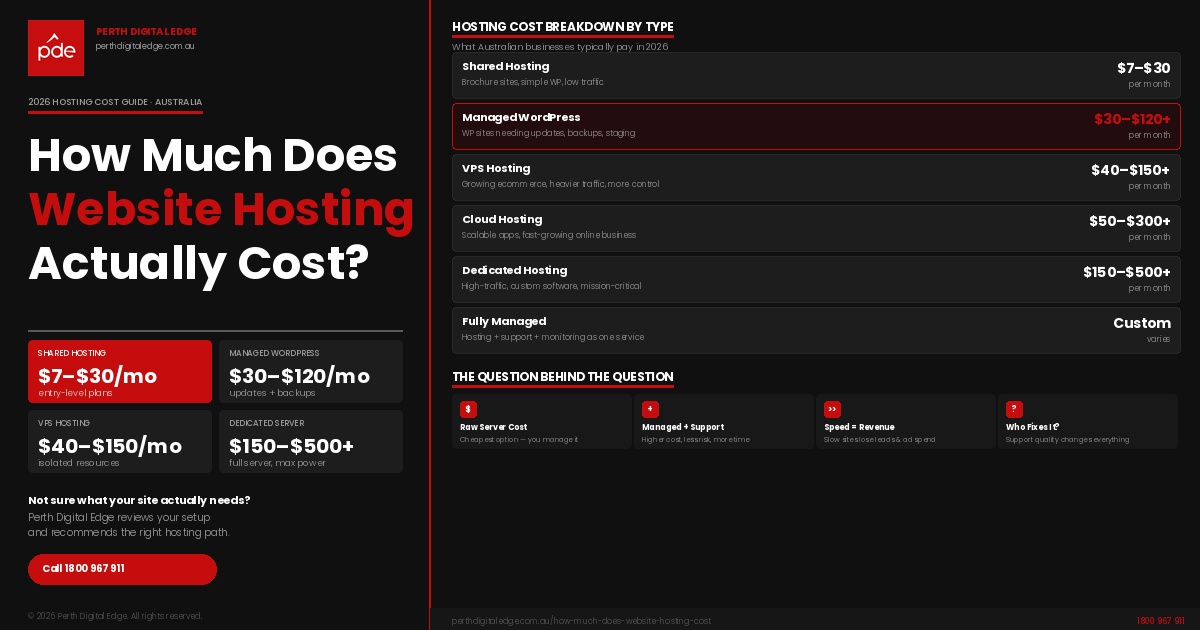
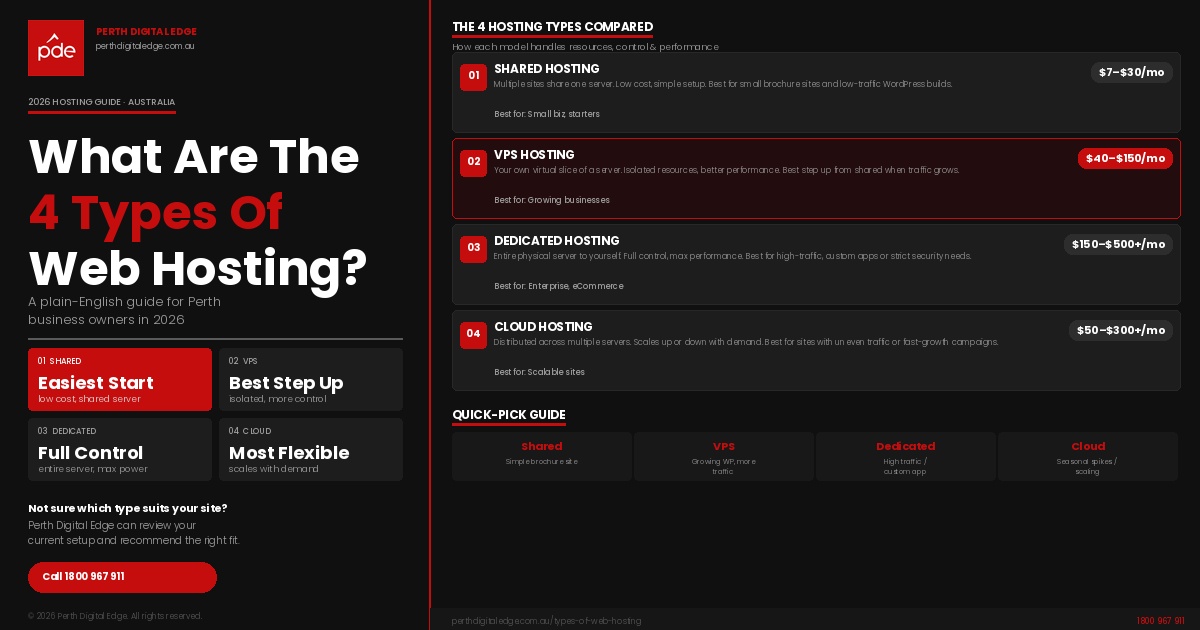
The four main hosting models you will see are shared hosting, VPS hosting, dedicated hosting, and cloud hosting. Those are the core types of web hosting used across the market, and each one handles resources, performance, control, and scalability differently.
The challenge is that a lot of pages explain these models like a textbook. They define the terms, give a short list of pros and cons, and stop there. That is not enough for a business owner trying to choose between a cheap entry-level plan and a more serious hosting solution.
This guide explains web hosting in a way that is more useful for real decision-making. It covers how each model works, what kind of website it suits, where the trade-offs sit, and how to choose the right environment for your site, your budget, and your level of technical expertise.
Why The Hosting Model Matters More Than People Think
A hosting decision shapes much more than where your website’s files are stored.
It affects how fast the site loads, how well it handles visitors, how isolated it is from other websites, how much control you have over the server environment, and how much server maintenance you need to think about. It also affects uptime, security, backups, plugin stability, and how painful future growth will be.
This is why the hosting model matters. A simple brochure site, a busy WordPress site, and a high traffic eCommerce build do not need the same server setup. The closer a site gets to revenue generation, lead generation, bookings, or day-to-day operations, the less sense it makes to treat hosting like an afterthought.
That is also why many website owners upgrade gradually. They begin with a lower-cost plan, then move to stronger infrastructure when the site starts carrying more of the business.
The Four Core Hosting Models
The main web hosting options most businesses compare are:
- shared hosting
- VPS hosting
- dedicated hosting
- cloud hosting
You may also come across terms like wordpress hosting, managed wordpress hosting, reseller hosting, and colocation web hosting, but those usually sit on top of or beside the four main models rather than replacing them.
The key difference between the main four is how server space, processing power, memory, and control are allocated. Once that becomes clear, the decision gets much easier.
Shared Hosting
Shared hosting is the most common starting point. In this setup, your site lives on a shared server alongside other websites. That means the machine’s CPU, memory, and storage are being divided across multiple users.
This is why shared web hosting is usually the lowest-cost option. You are sharing the same server resources with other customers, so the hosting company can spread costs more widely.
For a small business site, a temporary campaign site, or a low-traffic brochure website, that can be perfectly reasonable. If the site is light and the workload is modest, shared hosting plans are often enough.
The issue appears when the environment gets crowded. If other users on the same server consume too many resources, your own site performance can feel the impact. You also get less freedom around server settings, software versions, and deeper configuration changes.
Shared hosting usually fits:
- smaller websites
- lower-traffic business sites
- early-stage projects
- tighter budgets
- businesses that want a simple entry-level hosting plan
It is less suited to:
- high traffic websites
- heavily customised WordPress builds
- websites with demanding plugins
- projects needing more dedicated resources
- businesses wanting greater control over the server environment
Shared hosting is not the “bad” option. It is simply the lightest one.
VPS Hosting
VPS hosting stands for virtual private server hosting, and it is often the point where hosting starts feeling more stable.
A virtual private server sits on a physical machine that has been split into multiple virtual environments. Each virtual server operates independently, even though the underlying server hardware is shared. That gives your site a more controlled environment, better resource separation, and more predictable performance than a shared server.
This is what makes VPS hosting offers attractive for growing businesses. You are still not renting an entire physical server, but you are getting a cleaner slice of compute power, random access memory, storage, and operating capacity.
For a busy wordpress site, a service business with more traffic, or a setup managing multiple websites, VPS is often a much more comfortable fit than shared hosting. It gives you more room to operate without forcing you all the way up to a dedicated server.
VPS hosting often suits:
- growing business websites
- WordPress users with more plugins and traffic
- websites needing better site performance
- businesses wanting more flexibility
- projects that need stronger isolation than a shared server can provide
The main thing to watch is management responsibility. Some VPS plans are largely unmanaged, which means server administration, software updates, security work, and parts of server maintenance sit with the customer. If your team has limited technical knowledge, managed hosting services are often the safer option.
Dedicated Hosting
Dedicated hosting is the model that gives you the most control because your site runs on a dedicated server rather than sharing infrastructure with other users.
In practical terms, that means your project has access to the entire server. Not a virtual partition. Not a shared pool. The full machine. CPU, memory, storage, and the wider server environment are dedicated to your website or application.
That is why some businesses choose dedicated hosting when they need custom software, specific server configuration, stronger performance under load, or stricter isolation for security and control reasons.
This model is often used for:
- high traffic websites
- custom applications
- larger eCommerce builds
- websites with unusual server requirements
- businesses that need complete control over the operating system and server settings
A dedicated setup also comes with more responsibility. A dedicated server requires deeper technical expertise unless it is paired with a managed support layer. Patching, monitoring, security updates, and performance tuning all need to be handled properly.
Dedicated hosting makes the most sense when a business genuinely needs the overhead of an entire machine. It is powerful, but it is not automatically the right answer for every business simply because it sounds more advanced.
Cloud Hosting
Cloud hosting is built differently from the other three models because it relies on multiple servers rather than one machine alone.
That means the workload is spread across a wider infrastructure. If one server comes under pressure, others can help carry the demand. This is why cloud hosting utilizes distributed infrastructure and is often associated with flexibility, scaling, and resilience.
For websites with changing traffic patterns, campaign peaks, launches, or unpredictable growth, cloud hosting can be very attractive. It gives the environment more room to adjust as demand changes.
Cloud hosting is often a strong fit for:
- growing sites with uneven traffic
- eCommerce stores with seasonal peaks
- digital campaigns that can spike suddenly
- businesses wanting more elasticity in resources
- projects that benefit from multiple servers rather than one physical server
The part that confuses many buyers is that cloud hosting is less tangible. A shared server is easy to picture. A virtual server is easier to understand once explained. A dedicated server is obvious. Cloud infrastructure can feel more abstract, especially when providers package it differently.
So the real question with cloud is not whether it sounds modern. It is whether your site actually benefits from that model.
What About WordPress Hosting
A lot of searches for web hosting explained are really searches for wordpress hosting.
That makes sense. Many business websites run on WordPress, and WordPress users usually want to know whether they need something different from a standard hosting plan.
The important distinction is this: wordpress hosting is usually not a separate fifth core model. Instead, it is a hosting service built on top of one of the main four. A WordPress site can sit on a shared server, a virtual private server, cloud infrastructure, or a dedicated machine.
What changes is the support layer and the configuration.
Managed wordpress hosting often includes:
- WordPress-specific setup
- plugin and theme support
- performance tuning
- backup handling
- update management
- migration help
- staging support
- stronger security routines
That is why managed WordPress can be useful for businesses that want the benefits of WordPress without carrying all the technical work themselves.
What About Reseller Hosting And Colocation Hosting
You will also see reseller hosting and colocation hosting in the market.
These are real hosting models, but they serve a different purpose.
Reseller hosting is usually for agencies, freelancers, or businesses running a hosting business under their own brand. They buy infrastructure from a larger provider and package it as their own hosting service for clients.
Colocation hosting or colocation web hosting is more technical. In that setup, the customer owns the server hardware and places it inside a professional data center for power, cooling, connectivity, and physical security. This gives significant control, but it also assumes high technical expertise and a much more hands-on role in infrastructure management.
For most small and medium businesses, reseller hosting and colocation hosting are not the main decision. Shared, VPS, dedicated, and cloud will be more relevant.
How To Choose The Right Fit
The best way to choose a hosting type is to look at the role your website plays inside the business.
Ask:
- Is the site mostly informational, or does it actively bring in enquiries or sales?
- Is it light and simple, or does it have more moving parts?
- Are you running one site or multiple sites?
- Do you need complete control, or just reliable performance?
- Does your team have technical knowledge, or do you want managed hosting services?
- Is the current problem speed, stability, growth, or access?
A simple brochure site may be perfectly fine on shared hosting.
A growing service business with a more active WordPress build often benefits from a virtual private server.
A technically demanding project with strict control requirements may justify a dedicated server.
A business expecting fluctuating demand may find cloud hosting more useful.
The point is not to buy the most expensive setup. It is to match the environment to the actual workload.
Why The Provider Matters As Much As The Plan
This part gets overlooked constantly.
Two sites can be on the same hosting model and still have completely different experiences depending on the hosting company behind it.
One web hosting provider may overload a shared server, offer weak support, and make backups difficult to restore. Another may manage resources better, include stronger monitoring, and offer more useful support when something breaks.
That is why you should ask a hosting provider:
- where the servers are located
- how backups work
- whether SSL certificates are included
- what support channels are available
- whether the service is managed or unmanaged
- how upgrades are handled
- what happens when the site grows
- who handles server maintenance
This is also where Perth Digital Edge has a useful practical advantage. We also provide web hosting services, including local infrastructure managed through NextDC P1 in Malaga and NextDC P2 in Perth CBD, free SSL certificates, local support, cPanel access, and 21 days of backup points with backups taken four times per day. That gives businesses in Perth and across Australia a more concrete service layer, not just a plan label.
Frequently Asked Questions
What Are The 4 Main Web Hosting Options?
The 4 main web hosting options are shared hosting, VPS hosting, dedicated hosting, and cloud hosting.
Which Hosting Plan Is Usually Best For Smaller Sites?
Shared hosting is often the easiest and most affordable starting point for smaller sites with lower traffic and simpler requirements.
When Does VPS Hosting Become A Better Option?
VPS hosting becomes a better option when a website needs stronger site performance, more control, and better resource separation than a shared server can provide.
Why Would A Business Choose Dedicated Hosting?
A business may choose dedicated hosting when it needs an entire server, more dedicated resources, greater control over server settings, and stronger isolation for performance or security reasons.
Is Cloud Hosting Always Better Than A Dedicated Server?
Not always. Cloud hosting is often better for scaling and flexibility. A dedicated server can be better for fixed control, custom server configuration, and full use of one physical server.
Conclusion
The four main hosting models cover four different needs. Shared hosting is built for simplicity and lower costs. VPS is usually the next step when a site needs more stability and room to grow. Dedicated hosting is for projects that need full control and an entire server environment. Cloud hosting is often the better fit when flexibility and distributed resources matter more.
The right choice depends on what your site is doing now, what it is likely to do next, and how much technical responsibility your team wants to carry.
If you are comparing Perth web hosting options and want help choosing the right setup, contact Perth Digital Edge today. We can help you work out whether shared, VPS, dedicated, or cloud is the right fit, and we can also help with our own hosting services if you want a local provider to manage the environment properly from the start.