

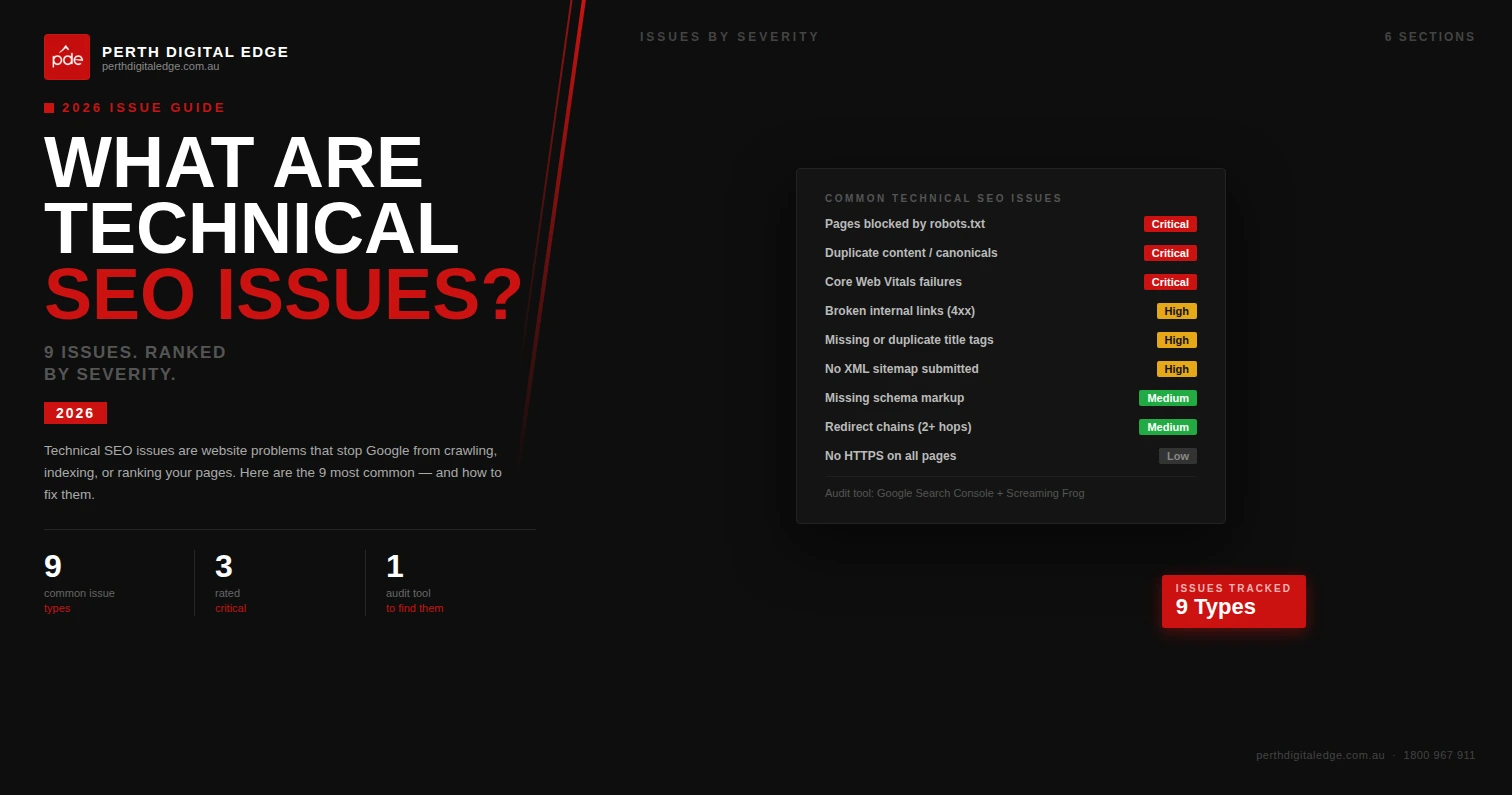
What are technical SEO issues, and why do they cost so many websites so much traffic? After more than a decade running technical projects at Perth Digital Edge, our answer is always the same: technical SEO issues are the invisible problems that stop search engines from crawling, indexing, rendering, or ranking your pages properly. Content can be excellent, backlinks can be strong, but if the technical foundation is broken, search visibility suffers. Most of the time, the website owner has no idea anything is wrong until organic traffic plateaus or drops.
This long-form guide walks through every common technical SEO issue we encounter during audits. We explain how to find each one, why it matters, and how our team fixes it. Everything here is drawn from real client work, not theory, so you can use it as a diagnostic checklist for your own site.
Why Technical SEO Issues Matter
Technical SEO issues matter because they sit upstream of every other SEO investment. A broken XML sitemap stops search engines from finding your important pages. A misconfigured canonical tag splits link equity across duplicate URLs. Slow page speed pushes users abandon sites before they ever see your content. Every technical problem chips away at search performance, and together they can cripple a site that otherwise has everything going for it. Users abandon sites that load slowly or render badly, and Google reads those behaviour signals as reasons to rank competitors higher.
When we audit a new client, we rarely find a site with zero technical SEO issues. Every website accumulates technical debt over time. Old redirects stack up. Plugins introduce conflicting canonical tags. A theme update breaks schema markup. A developer pushes a change that accidentally blocks important pages from being crawled. These problems rarely announce themselves. They just quietly reduce search visibility week after week.
The Most Common Technical SEO Issues We Find
Before diving into specifics, it helps to understand the big picture. The most common technical SEO issues we find on audits fall into predictable categories. Across hundreds of audits, roughly eight out of ten sites suffer from slow page speed, seven out of ten have duplicate pages or multiple URL versions of the same content, and six out of ten have broken pages somewhere in their navigation or sitemap. These common technical SEO issues frustrate users and search engine bots in equal measure, and they quietly suppress search rankings that should be achievable.
Users and search engines react to the same signals. When pages load slowly, users abandon sites and search engine performance drops. When broken pages litter the navigation, search engine crawlers waste budget and users hit dead ends. When relevant pages are hidden from search engine bots by bad canonicalisation, neither users nor Google can find them. Fixing these common technical SEO issues unlocks both user experience and search engine rankings at the same time.
Crawling And Indexing Issues
Crawling and indexing is the starting point for every SEO conversation. Search engines crawl the web constantly, and if they cannot crawl web pages on your site, they cannot index them. If they cannot index them, those web pages cannot earn search engine rankings. These are the first issues we investigate on any audit, because fixing them almost always improves seo performance within a few weeks as search engine crawlers and search engine bots re-evaluate the site.
Pages Blocked By Robots.txt
We regularly find important pages blocked by robots.txt. Sometimes a developer left a staging rule in production. Sometimes a plugin wrote the wrong instruction. The result is the same: search engines struggle to reach content they should be indexing. Google Search Console flags this under Coverage, and we always verify every Disallow rule in robots.txt against the intended crawl behaviour.
Noindex Meta Tag Applied By Accident
Another common problem is the noindex meta tag being applied to pages that should be indexed. This is especially common on sites that recently migrated from staging, where a blanket noindex was used and never removed. We pull a full Screaming Frog crawl to identify every page with a noindex meta tag and verify whether each one is intentional.
Orphan Pages
Orphan pages are pages that exist on the site but have no internal links pointing to them. Search engines rely heavily on internal links to discover new content, so orphan pages often never get crawled. We find orphan pages by comparing a full site crawl against the XML sitemap and the Google Search Console indexed pages report. Adding contextual internal links from related content usually fixes the problem within two crawl cycles.
Crawl Budget Waste
Crawl budget is the amount of resources Google allocates to crawling your site. Large sites waste crawl budget on low-value URLs, leaving less budget for important pages. Faceted navigation, filter URLs, session IDs, and calendar pagination are the usual suspects. We either noindex these pages, block them at robots.txt, or consolidate them with canonical tags depending on the context.
Duplicate Content Issues
Duplicate content is one of the most destructive categories of technical SEO issue. It splits link equity across duplicate URLs, confuses search engines about which page to rank, and wastes crawl budget on pages that add no unique value. Indexing multiple url versions of the same content is a problem we see on almost every ecommerce audit, and it hurts content quality signals even when the actual content is strong.
Duplicate pages also dilute relevant keywords across multiple pages instead of concentrating them on one version. Google then has to guess which version deserves to rank for a given query, and the guess is not always the one you want. Cleaning up duplicate pages lets search engines assign the full weight of your on-page signals and backlinks to the correct URL, which lifts search rankings quickly.
Multiple Url Versions Of The Same Page
Websites often serve the same content under multiple URL versions. HTTP and HTTPS, www and non-www, trailing slash and non-trailing slash, upper case and lower case. Each variant creates duplicate URLs that need to be consolidated. We set up 301 redirects to the preferred version and confirm canonical URLs point to the primary URL so link equity flows where it should.
Ecommerce Filter Pages
Ecommerce sites generate huge numbers of duplicate URLs through filter combinations. A single category might produce thousands of URL variations that all show essentially the same products in a different order. These confuses search engines and dilutes authority. We handle these through canonical tags, robots.txt rules, or URL parameter handling in Google Search Console depending on the platform.
Printer-Friendly And Tag Archive Pages
Older CMS setups often create printer-friendly versions of pages, tag archive pages, or date-based archives that duplicate the main content. These pages rarely attract search traffic but do waste crawl budget and create duplicate content. We noindex them or consolidate them through canonical URLs.
Broken Pages And Broken Links
Broken pages and broken links hurt user experience and waste crawl budget. When a user clicks a link and hits a 404 page, they leave. When a search engine crawler hits a 404, it wastes budget that should be spent on indexing important pages. We find broken pages through Screaming Frog and cross-reference with Google Search Console’s crawl error report. Every broken page either gets restored, redirected to the most relevant replacement, or removed from any internal links pointing at it.
External links from your site to broken third-party pages matter too. External links pointing at dead destinations look sloppy to users and signal low editorial quality to search engines. We audit external links at least annually and clean up anything that has died.
Site Speed And Page Speed Issues
Slow page speed is one of the most visible technical SEO factors. Slow loading pages push users away, hurt core web vitals, and signal poor quality to search engine algorithms. These are the site speed issues we find most often.
Oversized Images
The single most common page speed problem is images that have not been compressed or resized for the web. We find hero images delivered at 4MB when 200KB would look identical. Converting images to WebP, resizing them to the display size, and lazy-loading below-the-fold images typically cuts total page weight by 50% or more.
Render-Blocking CSS And Javascript Files
Unoptimised css and javascript files block browsers from rendering the page until they finish downloading. Combining, minifying, and deferring non-critical scripts can transform load times. We use PageSpeed Insights to identify which CSS and JavaScript files are blocking render on the most important pages, then work with the client’s developer to defer or remove them.
Slow Server Response Times
Sometimes the issue is the hosting, not the page itself. Cheap shared hosting produces slow time-to-first-byte which makes every page on the site slower. We often recommend migrating clients to better hosting as part of a technical engagement because the gain is immediate and visible across the entire site.
Excessive Third-Party Scripts
Every analytics tag, chat widget, retargeting pixel, and review widget adds load time. We audit the third-party scripts loaded on key pages and remove anything that is not essential. The difference can be dramatic on marketing-heavy sites that have accumulated a dozen tracking scripts over the years.
Mobile And Desktop Issues
Google indexes the mobile version of a site first, which means mobile and desktop sites need to be equivalent in content and functionality. We often find significant differences between mobile and desktop versions that are hurting rankings.
Mobile Viewport Meta Tag Missing
The viewport meta tag tells mobile browsers how to render the page at the correct scale. Without it, mobile pages render at desktop width and force users to pinch and zoom. We add the viewport meta tag to every template that is missing it as a quick, high-impact fix.
Content Missing From Mobile Pages
Some responsive designs hide significant content on mobile pages to reduce clutter. Google indexes the mobile version first, so any content hidden from mobile is effectively invisible to search engines. We audit mobile pages for content parity with desktop versions and restore anything that was hidden without a good reason.
Clumsy Mobile Navigation
Navigation that works fine on desktop can be unusable on mobile. Hamburger menus with nested accordions, tap targets too close together, and forms that do not fit the viewport all create poor mobile experiences. We test navigation on real devices and recommend fixes based on what actually works for users.
Site Structure And Internal Linking Issues
Site structure determines how easily search engines can discover and understand your content. Bad structure buries important pages, splits authority, and wastes crawl budget.
Poor Url Structure Urls
Poor url structure urls are urls that use random strings, numeric IDs, or deep nested paths that tell search engines nothing about the content. Clean URLs use words, are logically organised, and sit at a consistent depth. We audit URL structure early in every engagement and recommend rewrites where the impact justifies the migration effort.
Broken Internal Links
Broken internal links leak link equity and create a poor user experience. We run Screaming Frog to catalogue every broken internal link on the site and either update the target URL, redirect to the right destination, or remove the link entirely.
Missing Contextual Internal Links
Contextual links from body copy carry more weight than navigation links. We identify opportunities where older content could naturally link to newer important pages and add the links. This single tactic has lifted rankings for dozens of clients without any new content being created.
Flat Or Overly Deep Site Architecture
Both extremes hurt rankings. A completely flat site architecture with thousands of pages at the same level offers no hierarchy. An overly deep structure buries important pages five or six clicks from the homepage. We aim for a balanced site architecture where every important page is reachable in three clicks or fewer.
Metadata And On-Page Issues
Metadata sits at the intersection of technical SEO and on-page SEO. Technical audits always check that the metadata layer is clean and configured properly.
Missing Or Duplicate Title Tags
Title tags are still one of the most influential on-page signals. We find duplicate title tags on thousands of pages during audits, usually because a CMS template is generating the same title across different content types. We recommend templates that produce unique, descriptive title tags for every page type.
Missing Meta Descriptions
Missing meta descriptions leave Google to generate its own snippet from the page content, which rarely performs as well as a hand-written description. We prioritise unique meta descriptions for the pages that get the most search impressions, focusing on click-through rate rather than cosmetic completeness.
Page Titles And Meta Tag Problems
Page titles that are too long get truncated in search results. Meta tag formatting errors can trigger weird behaviour in search listings. We audit every page title and meta tag in Screaming Frog and flag anything outside best practice. A noindex meta tag applied by mistake gets corrected the same day we find it.
Structured Data And Schema Issues
Structured data errors are one of the most overlooked categories of technical SEO issue. Bad schema markup can disqualify pages from rich results or even confuse search engines about what the page is about.
Invalid Schema Markup
We test every page’s schema markup through Google’s Rich Results Test. Syntax errors, missing required fields, and deprecated schema types are common. We rewrite schema to match current Schema.org specifications and verify rich results appear correctly in search results.
Mismatched Schema
Schema that describes content different from what the page actually shows is a manual action waiting to happen. We ensure schema markup always reflects the real content of the page and never contradicts it.
Images And Media Issues
Images and media files contribute heavily to page weight and user experience. Handling them poorly creates multiple technical problems at once.
Broken Images
Broken images create a visible problem for users and a technical issue for search engines. We catalogue every broken image reference during a site crawl and either restore the image or remove the reference.
Missing Alt Text
Alt text helps search engines understand image content and is essential for accessibility. We audit alt text coverage across the site and recommend updates for images that lack descriptive alt attributes, particularly on entire site sections like product catalogues.
International And Multi-Language Technical Issues
Sites targeting multiple countries or languages add another layer of technical complexity. Hreflang tags tell search engines which version of a page to serve to which audience. We find hreflang implemented incorrectly on the majority of international sites we audit, either because tags are missing, pointing to wrong URLs, or returning different versions depending on the language of the request. Fixing hreflang issues can unlock meaningful traffic gains for brands operating across multiple markets.
Country-specific content and currency routing also need technical handling. We make sure geographic IP redirects do not prevent search engines from crawling alternate-language versions of the site, because aggressive auto-redirects can hide entire sections of a website from Google.
Technical SEO Issues On Ecommerce Sites
Ecommerce sites have their own set of technical pitfalls. Faceted navigation generates enormous numbers of filter URLs that create duplicate content. Out-of-stock product pages need careful handling so link equity is preserved. Pagination on category pages needs rel=prev and rel=next markup or a clear canonical strategy. Product schema needs to be kept current as inventory changes. We spend significant time on ecommerce projects working through these category-specific issues because the rewards are usually proportional to the number of products on the site.
Security And HTTPS Issues
Security issues can destroy organic traffic overnight. Expired SSL certificates trigger browser warnings that scare users away and cause Google to flag the site in search results. Mixed content warnings appear when an HTTPS page loads resources over HTTP, and Google interprets this as a security risk. We check SSL configurations, certificate expiry dates, and mixed content on every audit. We also look for security headers like Content-Security-Policy and X-Frame-Options that reduce exposure to attacks.
Compromised sites present another category of technical issue. Hacked pages injected into a site can trigger manual actions in Google Search Console and tank rankings immediately. We regularly clean up after security incidents, rebuilding trust signals and requesting review through Search Console once the underlying vulnerabilities have been patched.
JavaScript And Rendering Issues
Modern websites rely heavily on JavaScript frameworks. While Google can render JavaScript, it does so on a delay and with limited resources. Pages that depend on client-side rendering for their main content often get indexed with blank or incomplete content. We test JavaScript rendering using Google’s URL Inspection tool and recommend server-side rendering or static generation for critical content that must be indexed reliably.
How We Find Technical SEO Issues
Finding technical SEO issues requires the right combination of tools and expert judgement. Our standard audit workflow combines multiple data sources to surface problems that any single tool would miss.
Google Search Console
Google Search Console is the first place we look. Coverage reports, Core Web Vitals reports, manual actions, and security issues all provide direct signals from Google about what is wrong with the site. Search Console also shows which important pages are indexed and which are excluded, which quickly highlights indexation problems.
Screaming Frog Crawling
Screaming Frog produces the most comprehensive crawl data available. We configure it to mimic Googlebot and run full crawls of the entire site, then export the data into spreadsheets for deeper analysis. Broken links, duplicate content, missing metadata, redirect chains, and orphan pages all surface through this process.
PageSpeed Insights And Lighthouse
For performance issues, PageSpeed Insights and Lighthouse give both lab data and field data on core web vitals. We use them to identify render-blocking scripts, slow-loading images, and layout stability problems on the most important pages.
Manual Review And User Testing
No tool can replace a human review. We manually navigate the site on desktop and mobile, test forms, test site search, and check the user experience on real devices. Some issues only become obvious when you actually use the site the way a visitor would.
Fixing Technical SEO Issues
Finding technical SEO issues is only half the job. Fixing them properly is the part that actually improves rankings. Our approach focuses on prioritising high-impact fixes and implementing them carefully so nothing gets broken in the process.
We produce a prioritised action list that separates critical fixes from nice-to-haves. Critical fixes include anything preventing indexation, anything damaging core web vitals, and anything causing duplicate content. Secondary fixes address smaller efficiencies that add up over time. Implementation happens either through our in-house web development team or by handing the list to the client’s developer with clear specifications.
Post-implementation, we verify every fix with a fresh crawl and monitor Google Search Console for at least two weeks to confirm the changes have the intended effect. Some fixes show results within days. Others take weeks to propagate as Google re-crawls and re-evaluates the site.
How Technical SEO Issues Hurt Overall Search Performance
Technical SEO issues do not just hurt the pages they directly affect. They drag down overall search engine performance across the entire site. When Google encounters a site with persistent problems, it crawls less aggressively, trusts the content less, and hesitates to rank any of the pages highly. A single critical issue like blocked indexing can suppress search rankings across thousands of relevant pages at once. This is why broad technical work often produces surprising lifts in pages that were not even the focus of the fix.
We have watched sites double their organic traffic inside a single quarter without any new content being published, purely because technical debt was removed. Content quality finally had the space it needed, search engine bots could crawl efficiently, and search engines could see relevant pages clearly for the first time in years.
Real Results From Fixing Technical SEO Issues
Fixing technical SEO issues produces measurable results when the work is done properly. For Castle Security, addressing a combination of broken internal links, duplicate content, slow loading pages, and poor site structure drove organic traffic up 364% and placed 109 keywords on page one within six months. For Wholistically Healthy, fixing canonical issues and core web vitals lifted traffic 118% and conversion rate 51%. For Eco Style Pool Renovations, page speed improvements alone took PageSpeed from 27 to 86.
These are not typical results for every project. But they illustrate what is possible when technical SEO issues are addressed systematically rather than piecemeal. The gains compound because each fix removes friction from the path between your content and the people searching for it.
If you want the broader context on why these fixes matter so much, our article on why technical SEO is important explains how the technical layer sits underneath every other SEO investment.
Technical SEO Issues We See Across The Perth Market
Working with WA customers across the Perth metro area and regional towns, we see a few problems more often than the industry averages would suggest. FIFO rosters mean a lot of local tradies build their own Squarespace or Wix sites at midnight after a shift, which is admirable but usually leaves canonical tags, hreflang, and schema configured by default rather than by design. Perth ecommerce brands shipping across the Nullarbor often carry duplicate product pages from legacy Magento builds. Resources consulting firms in West Perth and Subiaco routinely have noindex tags left over from staging environments nobody touched since the last rebrand. We even had a Scarborough cafe whose XML sitemap was still pointing at a demo template from 2019, quietly bleeding visibility to better-configured competitors down the coast in Cottesloe.
There is a frustration in this pattern that we try not to dress up. Perth businesses work hard. They juggle seasonal tourism in Margaret River, mining downturns, construction cycles, and the long distances between customers and suppliers. Watching genuinely excellent work get buried because of a technical mistake nobody warned them about is the part of this job that still keeps us up at night. The flip side is the relief when a Wanneroo business owner rings to say the phone has started ringing again. That moment makes the tedious log-file review worth it.
Local Market Realities
Perth is more digitally competitive than people realise. We share a market with national franchises running consolidated SEO budgets, east-coast agencies chasing WA clients, and a wave of local operators who have caught on to how much technical SEO actually matters. That competitive pressure means small technical gaps compound fast. Businesses in Joondalup, Fremantle, or Rockingham can no longer get away with a brochure website the way they could five years ago.
Ongoing Technical SEO Maintenance
Fixing technical SEO issues is not a one-time project. Sites accumulate new problems every week. CMS updates introduce compatibility issues, plugin updates can change canonical behaviour, content editors can accidentally publish pages with incorrect meta tags, and site migrations can break thousands of URLs at once. Ongoing technical maintenance catches these problems early so they never have the chance to damage search performance significantly.
Our retainer clients get continuous monitoring through Google Search Console alerts, monthly crawl reports, and quarterly deep audits. This catches issues within days rather than months, and we typically prevent the sort of gradual traffic decline that catches untreated sites off guard. Prevention is always cheaper than recovery when it comes to technical SEO.
Frequently Asked Questions
The questions we hear most about technical SEO issues and how to fix them.
How Often Do New Technical SEO Issues Appear?
New issues appear constantly. Every CMS update, plugin change, theme tweak, or content migration can introduce new problems. We recommend ongoing monitoring through Google Search Console plus a full crawl at least quarterly for active sites.
Can We Fix Technical SEO Issues Ourselves?
Some can be fixed without specialist help. Broken links, missing meta descriptions, and basic canonical tag issues are approachable for most website owners. More complex issues like core web vitals, schema markup, and site architecture usually need specialist support.
How Do We Know If A Site Has Technical SEO Issues?
The fastest way to find out is to run a crawl with a tool like Screaming Frog and review Google Search Console for coverage and performance issues. If you are not sure what the data means, a professional audit from an experienced team will give you a prioritised list of problems to fix.
How Long Does A Technical SEO Audit Take?
For most business websites, a complete audit takes between five and ten working days. Large ecommerce sites with tens of thousands of URLs can take longer because there are more patterns to analyse.
What Is The Single Most Common Technical SEO Issue?
In our experience, slow page speed is the most common technical issue we see. Almost every site we audit has some combination of oversized images, render-blocking scripts, and slow server response time that needs addressing.
Final Thoughts And Next Step
Technical SEO issues are the silent tax on your organic traffic. Every issue left unfixed is rankings, leads, and revenue you never see. Fixing them systematically produces results that compound over months and years. If you want an experienced team to audit your site, prioritise the fixes, and implement them properly, explore our technical SEO services in Perth or contact our team for a free audit. We will show you exactly which technical SEO issues are holding your site back and give you a clear plan for fixing them.